

 LinkedIn
A competitor gets named when a buyer asks an AI assistant for a solution like yours. You get nothing. I treat that miss like a bad line in a search-term report: record the query, repeat the test, inspect what won, and find the failure before changing anything. A gap without a diagnosed cause is just a complaint. This checklist takes you from buyer questions to repeated prompt runs, then sorts each persistent miss into four useful buckets: no relevant page, unreadable page, weak page, or no outside authority. Work through it in order. A screenshot tells you what happened once; a log tells you what to fix.
Phase 1: Hold the test conditions steady
- Choose more than one engine. Test ChatGPT search, Perplexity, and Google AI Overviews rather than treating one assistant as the market. Their answers and citations need not overlap, so a win in one cannot stand in for visibility in the others. Keep the engine list fixed for each audit cycle; otherwise, a change in your results may reflect a change in the test rather than a change in how often your brand appears.
- Run every prompt three times. Record the runs separately and flag a working gap when your brand is absent in at least two of three. That is a triage rule, not proof that no buyer will ever see you. One screenshot is too noisy to justify a page rewrite, and combining three outputs into a single yes-or-no score hides the inconsistency you need to understand.
- Control the session and location. Use fresh, logged-out sessions, note the location used for each test, and hold those conditions steady when you repeat it. Clear the browser cache and disable personalization where you can. Do not mistake a locally tailored answer for a universal recommendation: a prospect elsewhere may see a different vendor list even when they ask the same question.
- Mark whether the assistant searched the web. A response with active retrieval tests a different path from one produced without a visible search step. Log that distinction instead of mixing both outputs into one citation score. If the assistant did not browse, you cannot use its failure to cite your newly published page as evidence that a crawler rejected it.
Phase 2: Turn buyer friction into prompts
- Pull converted search terms, not broad keywords. Start with longer Google Ads queries from the last 90 days that led to qualified pipeline or sales. They give you buyer language with a commercial signal behind it. Keep the wording close to the original query when you turn it into a prompt; otherwise, you may end up testing your edit rather than the buyer’s question. A generic prompt such as “software” may produce a tidy list, but it will not tell you much about the questions that matter to your account.
- Mine lost-deal notes and sales transcripts. Add the comparisons, objections, and constraints buyers raised while evaluating vendors. If a pricing or feature question came up across several calls, test the question rather than a polished version your marketing team prefers. The point is to find the prompt where a buyer might choose a competitor, not to win an answer to a question nobody asks.
- Group prompts by intent. Keep category questions, direct comparisons, and constraint-based problems in separate groups. “Best autonomous growth engine for paid search” tests category visibility; “Brand A vs. Brand B pricing structure” tests positioning; “How to optimize multi-location PPC without adding agency headcount” tests whether an assistant sees you as a solution. Separate groups make a missed mention easier to diagnose. Do not average them into one score before you know which kind of question you are losing.
- Leave your brand out of baseline prompts. “What does my brand do?” tests whether the assistant can recognize your name, not whether it would recommend you to an unprompted buyer. Keep branded questions in a separate diagnostic set if you use them at all. For the competitive benchmark, ask the question a buyer would ask before they know your name.
- Add real buying constraints. Test modifiers such as a five-person marketing team, a flat monthly fee instead of a percentage of spend, or a specific technical requirement. Constraints can change which vendors an assistant names and why. Do not invent restrictions merely to force your brand into an answer; use the conditions that appear in your search terms, sales notes, and actual offer.
Phase 3: Save the answer behind the score

- Record when and where each run happened. Save the timestamp, engine, available version details, test location, and whether web retrieval appeared to run. AI answers and their source pools change; an undated visibility score cannot tell you whether a page update helped or the testing conditions shifted. Make the log detailed enough that someone else can repeat the run without guessing which prompt or settings you used.
- Separate mentions from citations. Log whether your brand appears in the answer and whether your own URL appears among the sources. An assistant can name you while citing a directory or another site; it can also cite a page without making you a recommendation. Those are different signals and call for different fixes. A single “visible” checkbox throws away the distinction.
- Write down every competitor named and the role they play. Is the competitor the direct recommendation, one option in a list, or an example with a drawback? Capture that context alongside the mention. Repeatedly appearing beside the same vendors tells you more than a raw count, especially when your brand is missing from a category or constrained buying question.
- Archive the full answer and its cited URLs. Keep the response text, links, and prompt wording for each run rather than relying on a dashboard’s summary score. You need the actual sources to see which page supplied a claim or comparison. Save the answer even when it contains no citations; that absence belongs in the record too. Standalone tracking tools such as Profound, Otterly, and Peec AI can help record mentions; a mention chart alone still cannot tell you what to repair.
- Distinguish a direct pick from a vendor list. Mark whether the assistant recommends one option against the prompt’s constraints or includes a dozen names without choosing. Both can contain a brand mention, but they do not carry the same meaning for a buyer. Read the answer before celebrating the count: being buried in a long list is not the same as being selected.
Phase 4: Give each miss a cause
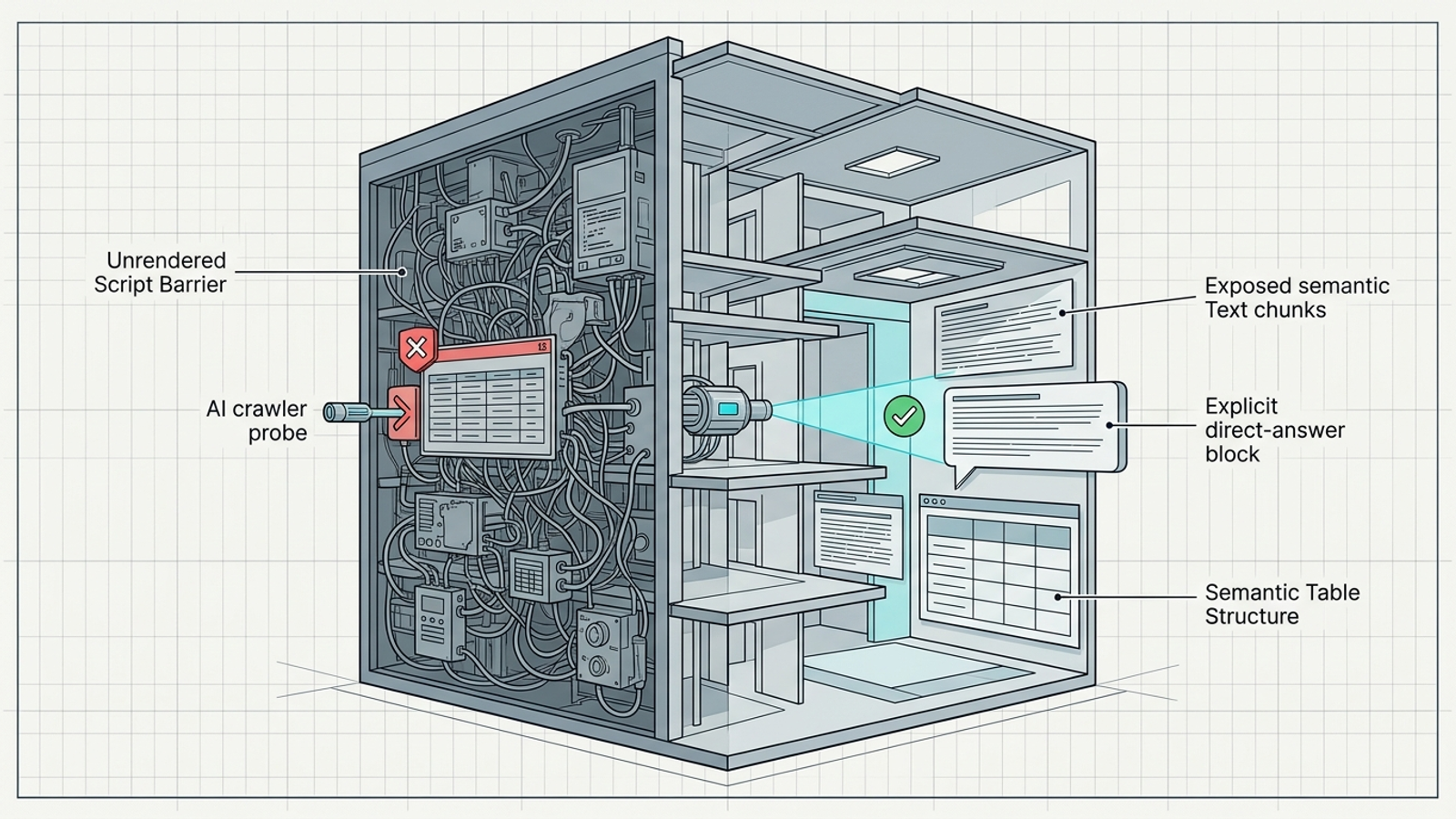
- Check whether the page can be fetched. Review relevant server logs, robots.txt rules, and security responses for the crawlers involved. A firewall challenge, blocked user agent, or failed response can keep a page out of a retrieval path before its copy gets a chance. Classify that as an unreadable page and fix access before rewriting the headline.
- Compare rendered content with server-delivered HTML. Inspect whether pricing, product capabilities, and comparison details appear in the HTML a fetcher receives or only after client-side JavaScript runs. If the useful text sits inside a late-rendered interface, a retrieval system may miss it. Treat that as another readability problem; better wording inside an empty initial response will not solve it.
- Look for the answer near the top of the page. If the page opens with a long introduction before explaining what you do, move the relevant answer into a clear, self-contained passage. An assistant assembling an answer needs usable text, not a slow reveal. This is a weak-page diagnosis only after you have confirmed the page exists and can be read.
- Make comparisons explicit. Where a page compares vendors, check whether it states the actual pricing model, contract terms, technical limits, and features the buyer asked about. A structured table can make those distinctions easier to inspect than a paragraph of “scalable” and “enterprise-ready.” Check the missed prompt against the table’s labels: a row that never addresses the buyer’s constraint is not a fix. Do not fill empty cells with guessed specifications; a clear omission is better than a confident false claim.
- Find the missing owned page. Match each persistent missed prompt to the URL meant to answer it. If a buyer asks about multi-location Google Ads attribution and you have only a passing bullet on a general services page, mark the gap as no relevant page. That gives the content team a concrete assignment instead of the instruction to “improve AI visibility.”
- Inspect the outside sources behind the competitor’s mention. Note whether the answer leans on review directories, forums, benchmarks, or publications. If those sources repeatedly support a competitor while your owned page is readable and answers the question, classify the miss as no outside authority. Another homepage rewrite will not put your brand into a third-party source pool.
Phase 5: Route the fix to the right work
- Rank gaps by buyer value, frequency, and effort. Give commercial intent a 1–5 score, record how often the competitor won across your three runs, and weigh both against implementation complexity. Use the ranking to choose work, not to pretend the arithmetic predicts revenue. Keep the underlying runs beside the score so an inconsistent answer does not masquerade as a settled result. A repeated miss on a constrained vendor-comparison prompt belongs ahead of a broad definition question with no clear buying intent.
- Assign each priority gap a specific fix. Route an unreadable page to an access or rendering task; a weak page to an answer or comparison rewrite; a missing page to a new asset; and an authority gap to the relevant external-reference work. Name the URL or source involved. At groas, the point of connecting prompt discovery to an autonomous growth engine and MCP tooling is to connect the finding to execution, not leave another recommendation sitting in a dashboard.
- Use a clear table when the buyer needs a comparison. For owned comparison pages, put concrete pricing models, contract terms, or feature distinctions in labeled rows where the information is available. Keep the surrounding explanation, but do not make a reader or retrieval system reconstruct the comparison from scattered bullets. The repair should answer the missed prompt directly, not merely add more words to the page.
Phase 6: Retest the fix, then keep testing
- Retest after publication without demanding an overnight win. Use a 14-day checkpoint for the updated page, then repeat the original prompts under the recorded test conditions. Note whether the assistant fetched the new page, cited it, mentioned your brand, or still preferred a competitor. Compare each of those signals with the original log rather than declaring victory from a different prompt. A miss after 24 hours does not, by itself, prove the change failed; an apparent win from one run does not prove it held.
- Keep testing the same prompt set after the audit closes. This is the item teams skip: they see one favorable answer, close the spreadsheet, and stop looking. Run ongoing prompt regression checks, log new competitors and lost mentions, and send each persistent miss back through the four cause buckets. If you cannot maintain that loop manually, an always-on system such as groas can pair continuous execution with a human strategist who owns direction and accountability. Skip the regression check and you may not notice a lost buyer recommendation until the pipeline has already moved elsewhere.